Hide Caller ID on Android: A Comprehensive GuideIn today's privacy-conscious world, knowing how to hide caller ID on Android devices is essential. Whether you're calling a business, reporting an issue, or want to maintain anonymity, You can also use Android 16 latest features that offers multiple methods—some built-in and others via apps or carrier services. This article walks through each method step by step, ensuring you can mask your phone number whenever necessary.
Hide Caller ID via Android Settings
Why Use Settings?
Choosing to hide caller ID through settings saves you from entering codes every time. It's a global, one-time setup that applies to all outgoing calls—except emergency and toll-free numbers.
Where to Find the Option
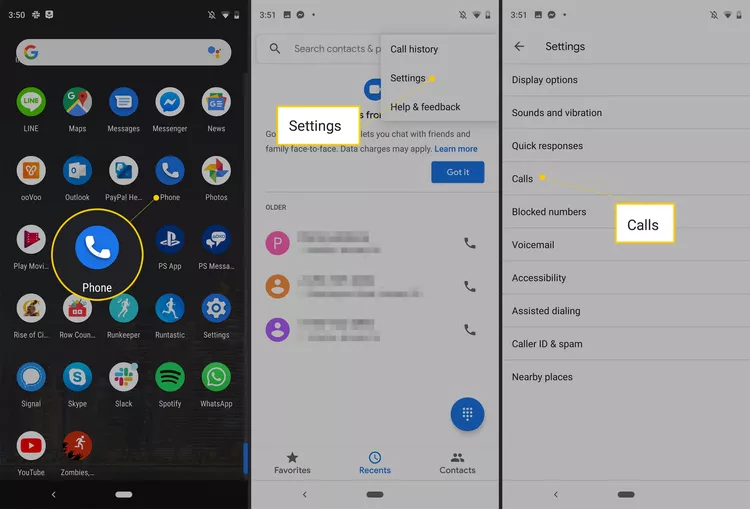
Though UI varies by device, the general path is:
- Open the Phone app.
- Tap ⋮ (three-dot menu) → Settings.
- Go to Calls, Calling Accounts, or Supplementary Services.
- Tap Additional Settings (if present).
- Select Caller ID.
- Choose Hide number, Never, or similar wording instead of "Network default" or "Show number".
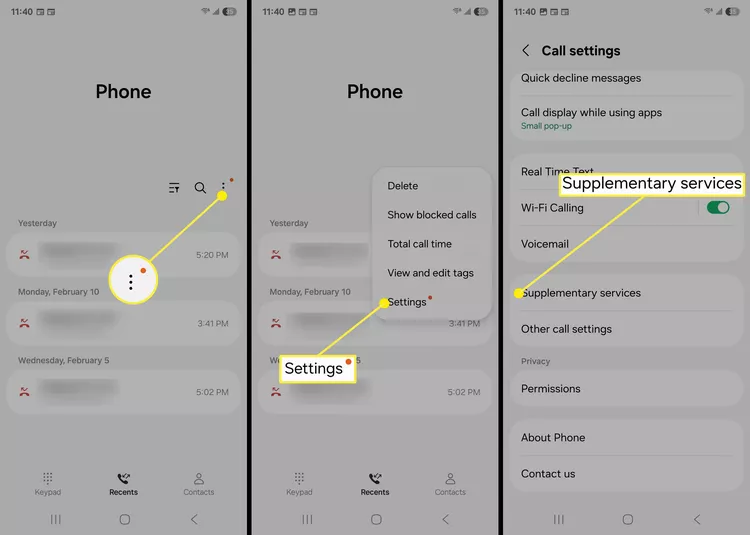
Once configured, all your outgoing calls will appear as “Private,” “Unknown,” or “Blocked” to recipients. To reverse, choose “Show number” or “Network default”.
Limitations: Not all Android builds or carriers support this option. Emergency calls (e.g., 112 in India, 911 in the US) bypass the block.
Hide Caller ID for a Single Call Using Prefix Codes
Why Use Prefix Codes?
Need anonymity only occasionally? Prefix codes let you hide caller ID on a per-call basis—no need to change settings.
Common Prefix Codes by Country
| Region | Prefix Code |
|---|---|
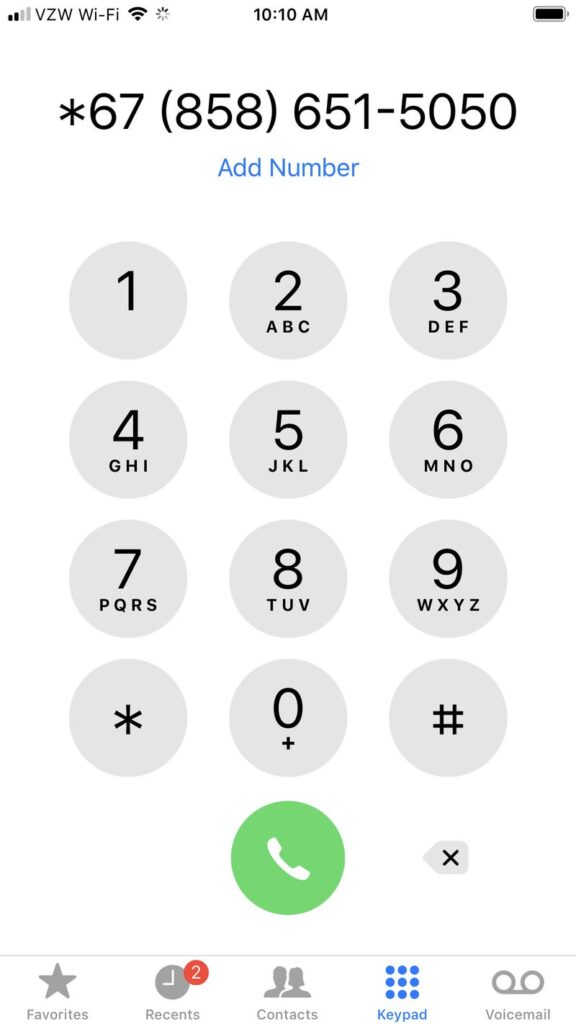
| US, Canada | *67 |
| UK, Ireland | 141 |
| Most Europe | #31# or *31# |
| India | #31# |
To use: dial the prefix before the number—e.g., #31#1234567890
Note: these codes won’t work for toll-free numbers or emergency services, and some recipients may reject hidden calls.
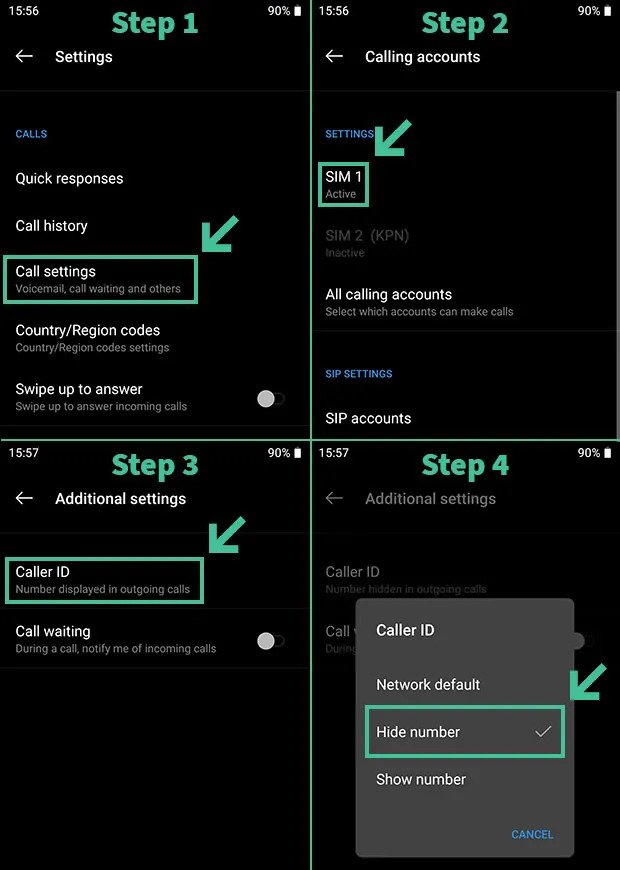
Use Google Voice for Anonymity
Google Voice allows you to hide caller ID by using an alternate number:
- Install and open Google Voice.
- Go to Settings → Calls.
- Enable Anonymous caller ID.
All calls through Google Voice then show as anonymous or show the Google Voice number instead of your real number.
Ideal for those who need recurring anonymity without prefix codes or settings changes.
Use Burner/Temporary Number Apps
Apps like Burner, Hushed, Dingtone, or CoverMe provide disposable numbers that protect your real caller ID. Here's how they work:
- Install from Play Store.
- Create an account and select a temporary number.
- Use the app to dial—recipients see the burner number, masking your original one.
Great for one-off deals, online dating, or sensitive calls. Many services offer limited free minutes; subscriptions unlock more.
Ask Your Carrier to Block Caller ID Permanently
Some carriers support network-level hide caller ID:
- Call or visit your provider’s customer support.
- Request permanent Caller ID blocking on your line.
- Provide verification details.
Once activated, your number is blocked by default on every call—no code needed. Some carriers may charge a nominal fee.
Pros: Always-on privacy.
Cons: Some callers may reject hidden calls; rates may apply.
Using Dial Codes to Toggle Caller ID Programmatically
Advanced users can use secret codes like:
*#31#– hide permanently (code executed via dialer)#31#phonenumber– hide for that call*31#phonenumber– unhide for that call
These aren’t universal—availability depends on OS version and carrier. Use with caution; test in your region first.
Limitations & Special Cases
Emergency or Toll‑Free Numbers
Your number can't be hidden when calling emergency services (e.g., 112, 911) or toll-free lines .
Recipient Preferences
Some recipients reject calls from hidden numbers. Even with settings active, they may simply not answer .
Carrier/Region Lockouts
In some countries (e.g., India), settings may be disabled by default. Codes like *67 or #31# may still work if supplementary services are accessible.
Legal & Ethical Considerations
Using anonymity tools to commit fraud is illegal. In India, for instance, CLI spoofing is a punishable offense . Always ensure your intent is lawful.
Protecting Against Spoofing
While you learn how to hide caller ID, it’s equally important to guard against caller ID spoofing—when scammers fake IDs. Protect yourself by:
- Enabling Android’s Caller ID & Spam Protection in Settings.
- Using third-party apps like Truecaller, Robokiller.
- Checking your bill regularly and reporting suspicious call.
Quick Comparison of Methods
| Method | Permanence | Ease of Use | Requirements |
|---|---|---|---|
| Android Settings | Permanent | High | Settings option + carrier support |
| Prefix Code (*67/#31#) | Per call | Medium (one-time code) | Carrier supports code |
| Google Voice | Permanent | Medium | Internet + app |
| Burner/Temporary Apps | Per call/periodic | Medium-Low | App + subscription |
| Carrier Blocking | Permanent | Low (setup once) | Willing carrier |
| Dialer Codes (*#31# etc.) | Permanent/Toggle | Advanced | Code support |
Step‑by‑Step Guides
Permanently Hide via Settings
- Open Phone app → ⋮ → Settings.
- Go to Calls / Supplementary Services.
- Tap Additional Settings → Caller ID.
- Select Hide number / Never.
- Test by calling another line.
One‑Time Hide with 67
- Open Phone dialer.
- Type
*67+ destination number. - Press Call—number appears hidden to recipient.
Using Google Voice
- Install and open Google Voice.
- Follow setup and assign a secondary number.
- Go to Settings → Calls.
- Enable Anonymous caller ID.
With Burner/Hushed
- Download app from Play Store.
- Sign up and pick a number.
- Use built-in dialer to place calls.
Carrier‑Level Blocking
- Call carrier support or use their app.
- Ask for “blocking of CLI” or “hide caller ID” on your line.
- Confirm activation. Done!
Troubleshooting
- No Hide Option in Settings?
Use prefix code or carrier method. Some operators disable settings ui. - Code Not Working?
Verify it's correct for your country. In India, try#31#, not*67. - Some Calls Leak ID?
Emergency or specific service calls always display ID by regulation. - Recipients Block Hidden Calls?
There's limited workaround—consider using Google Voice or burner number.
Best Practices & Tips
- Don’t change settings frequently—it may confuse contacts.
- For regular anonymity, network-level blocking is most reliable.
- Use temporary numbers if you're going to call many unknown contacts.
- Keep spam/protection features active to avoid unwanted spoofed calls.
- Regularly review call logs and mobile invoices for possible misuse.
- Understand your legal obligations—misuse can be unlawful.
Read more: Factory reset your Android in 8 simple steps to increase speed, performance
Mastering how to hide caller ID on Android gives you control over your privacy. Between built‑in settings, prefix codes, Google Voice, burner apps, and carrier services, you have flexible options tailored to different use-cases—from a casual anonymous call to ongoing confidentiality.
Remember: True anonymity is never absolute—emergency services and robust networks track your calls. Still, these tools can significantly help maintain your privacy and reduce unsolicited outreach. Use responsibly, ethically, and in compliance with your local laws.
Comments
Post a Comment