In today’s real-time world, X.com (formerly Twitter) isn’t just about posting—it’s also an incredibly powerful search engine for social media. Whether you're researching trends, unearthing old tweets, discovering media, or tracking hashtags, knowing how to use X’s search features gives you a competitive edge. This guide will walk you step-by-step through basic and advanced search, media discovery, hashtag tracking, trending post detection, and timeline integration.
X has also become the #1 news app recently on both iOS and Android app stores. Despite being a social media platform, most users stay connected to the world with X, as new tweets start delivering the best content. This makes it possible to track all trends using X advanced search tools. You can also sort by media, posts and replies, latest posts to find your content more easily.
Follow the below guide to learn about X advanced search and find latest twitter trends, hashtags and media.
Basic Search: The Starting Point
Accessing Search
- On web: Click the magnifying-glass icon or jump directly to X.com and type in the search bar.
- On mobile apps (iOS & Android): Open the Explore tab and tap the search field.
Filters like Top, Latest, People, Photos, Videos, News, and Broadcasts appear once you enter a query.
Filters Explained
- Top: Popular and relevant content.
- Latest: Chronologically newest posts.
- People: Usernames and account profiles.
- Media (Photos/Videos): Posts containing visual content.
- News/Broadcasts: Official sources or livestreams.
Mobile apps also let you refine to “From anyone” vs “People you follow” and “Near you” vs “Everywhere”.
X Advanced Search: Precision at Scale
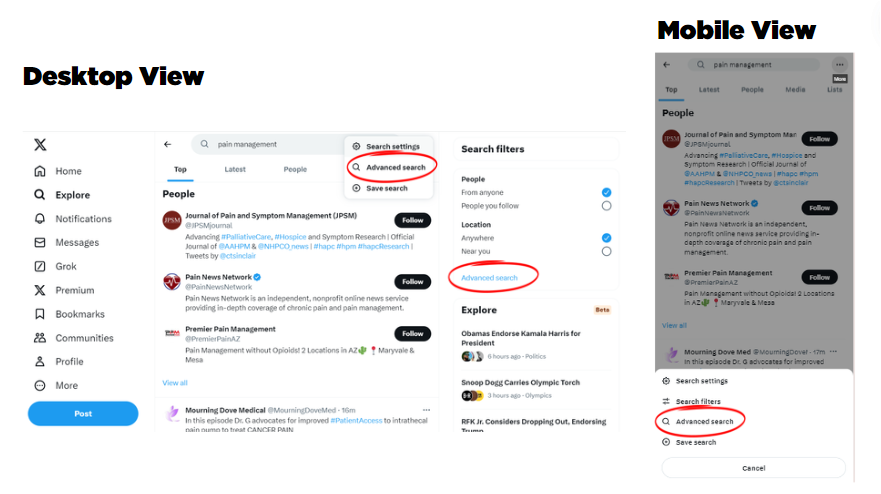
For refined, targeted results, Advanced Search on the web is indispensable .
How to Access X advanced search
- Enter a keyword or phrase in the search bar.
- On web, click More options or the three-dot menu > Advanced search.
- A multi-field form appears.
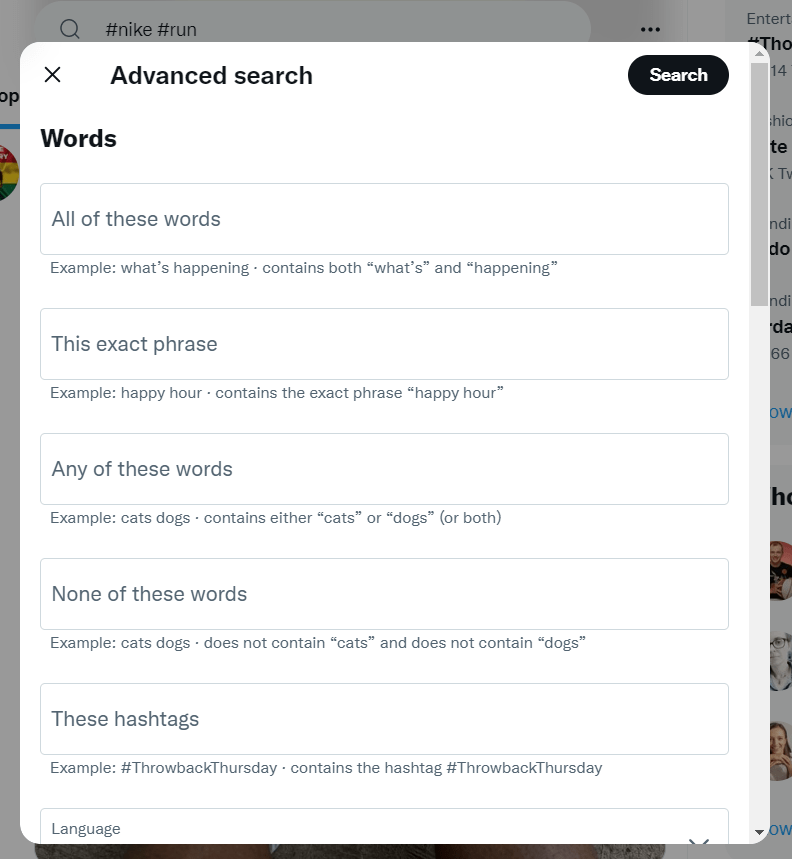
Word Filters
- All these words: Must include all terms.
- This exact phrase: Enclose your search in quotes.
- Any of these words: At least one term.
- None of these words: Exclude unwanted terms.
- These hashtags: Limit to specific hashtags.
- Language: Filter by language.
Account Filters
- From these accounts: Tweets from a user.
- To these accounts: Replies directed at a user.
- Mentioning these accounts: Tweets tagging a user.
Other Filters
- Replies: Include or exclude replies.
- Links: Filter posts with URLs.
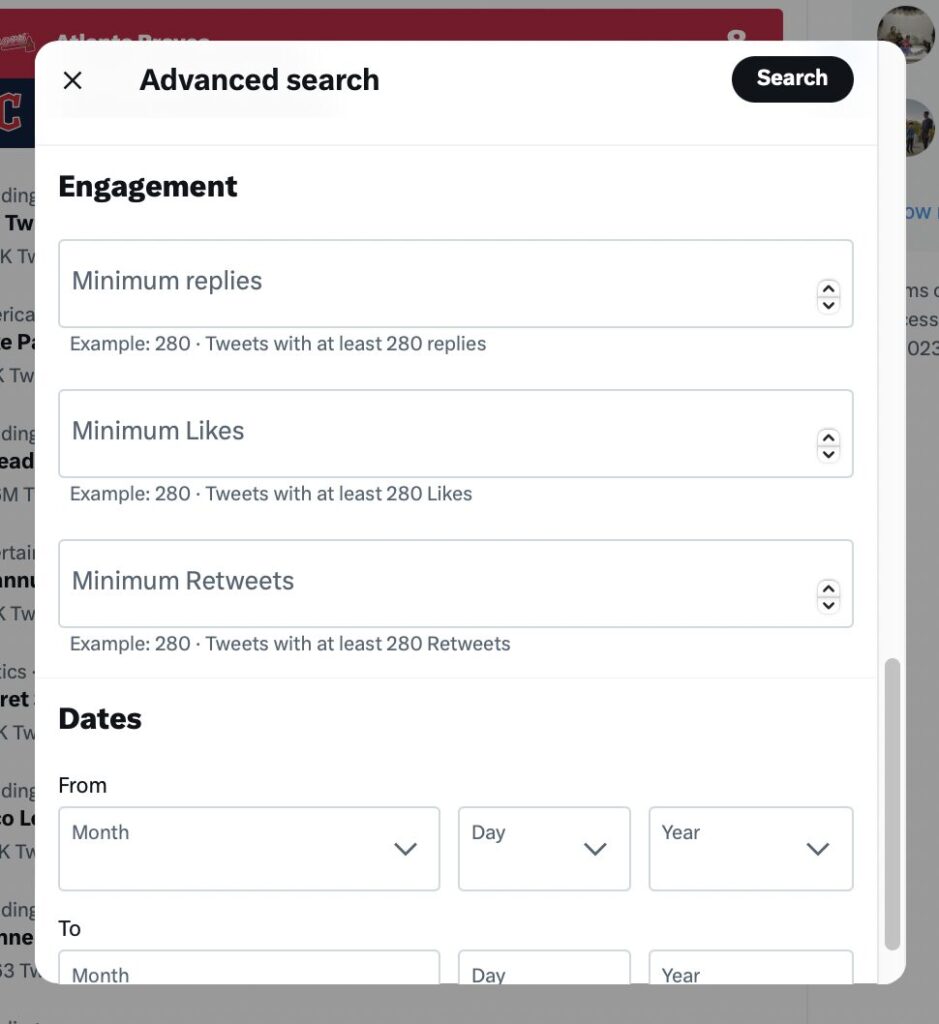
- Engagement: Specify minimum likes, replies, retweets.
- Dates: Use a date range (e.g., since/until) .
- Places: Geo-tagged tweets within a location.
Search Operators: Shortcut to Precision
You can type queries directly into the search bar using operators :
from:username"exact phrase"-word(exclude)filter:links,filter:media,filter:images,filter:videosmin_retweets:n,min_faves:n,min_replies:nsince:YYYY-MM-DD,until:YYYY-MM-DDnear:place within:10mi
Example:
from:elonmusk "Mars mission" filter:links since:2025-01-01 min_retweets:100
Finding Media and Hashtags on X advanced search
Photos & Videos
- Use search filters or
filter:images/filter:videos. - From basic search: go to “Photos” or “Videos”.
- From advanced: check Tweets with media or only images/videos.
Hashtags
- Search via
#YourHashtagor use the hashtag filter in advanced search. - Combine it with other operators—for example:
#WorldCup from:@FIFA since:2025-06-01 until:2025-07-01 filter:videos min_retweets:50
Trending Posts & Insights on X search
Trends Section
The Trends panel (once “Explore”) shows trending hashtags/topics tailored to your location and followers.
Using Search to Spot Trends
- Enter a trending hashtag and explore metrics: likes, replies, retweets.
- Or in advanced search:
#BigEvent since:2025-07-01 min_retweets:500
This surfaces viral content quickly.
Monitoring Momentum
- Sort by Latest to monitor real-time posts.
- Use
min_retweets:or engagements to only see high-impact posts.
Timeline & Lists Integration (X.com search Pro Users)
With X Pro (formerly TweetDeck-like tools), you can:
Collections (Columns)
- Create a Collection column for specific topics.
- Add tweets manually or by drag-and-drop.
Live-Update Columns
- Set up live-search columns filtered by keyword, location, media type, engagement, etc.
- Use wildcards (
*) to capture sentiment variations:
"San Francisco is *"
This shows humor, temperature, beauty quotes, etc .
Sentiment Tracking
Try happy or sad to gauge tone around topics .
Real-World Use Cases
- Brand monitoring
(YourBrand OR "Your Brand") -from:YourBrand
Track conversations excluding your own launches .
- Event coverage
#Conference2025 filter:links filter:media since:2025-03-01 min_retweets:100
Gather trending media and links.
- Local news & emergencies
earthquake near:Los Angeles within:50mi filter:media
Find eyewitness photos/videos.
- Sentiment research
Olympics since:2025-07-01
Gain real-time mood tracking.
Tips & Best Practices
- Save and embed searches via “Save this search” or “Embed this search” options.
- Clear search history if desired via mobile options.
- Use safe search to filter mature/downvoted content—but you can toggle this off.
- Combine operators:
from:Username filter:media min_replies:10 since:2025-01-01. - Use quotes to enforce exact phrase matching.
- Geo-locate with precision, then drill down using “Latest” or engagement filters.
- On X Pro, assign sound/desktop alerts for top matching posts—ensure you stay informed.
Mastering search on X.com transforms this social network into an insights engine:
- Basic search offers quick filtering.
- Advanced search gives nerves-pinning precision.
- Media & hashtag tools help curate visual/story content.
- Trending & timeline features enable you to ride the wave of real-time conversations.
- X Pro tools (columns and collections) support continuous monitoring.
When compared with other SMM platforms like Facebook, Instagram, Snapchat and Reddit - X has more options and feels lively to use as everybody posts their opinion for the world to see. This makes it easy to take sides as two accounts discuss with each other. Other users can also join the discussion, but when mounted on a worldwide social media platform, the debate becomes worthwhile. This made X very popular over the last few years compared to its competitors.
Use the operator cheat sheet, tailor filters to your goals, and layer queries for powerful content discovery. Whether you're a marketer, journalist, researcher, or hobbyist, applying these techniques lets you extract meaningful signals from the stream of daily posts.
Comments
Post a Comment