In the age of AI-generated photos, a new emotional and artistic trend has gone viral the Hug My Younger Self photo trend. This heart warming idea brings together your present and past self in a single image usually a hug made using AI tools. Whether you're doing it for fun, healing or just to follow the trend. It's a powerful way to show how far you have come.
Hug My Younger Self Trend Prompts, Tutorial
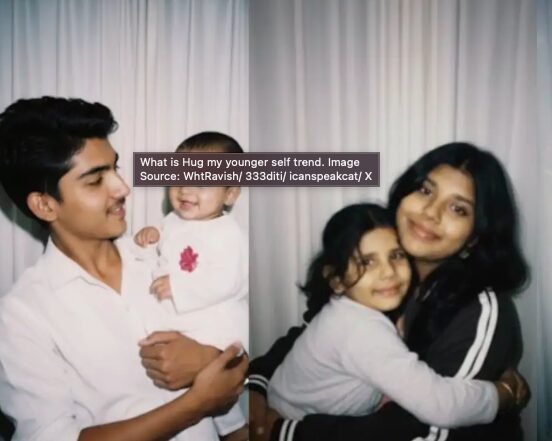
The “Hug My Younger Self” trend is a viral movement like AI Saree trend where people use Google Gemini to create photos that show their current self hugging their childhood self. Instead of simply placing two photos side-by-side, the AI merges both images into one realistic and touching scene. It often looks like a moment captured from a dream, memory or movie.
How to Create Hug my younger self images with Nano Banana?
Here are the steps to do this trend yourself using Gemini Nano Banana:
Install or open Gemini
Download the Gemini app on your Android. Or go to the Gemini website in your browser. Then, sign in with your Google account.
Pick Your Two Photos
You will need one photo of your younger self which is the childhood picture with face clearly visible. One photo of you now which is clear face, good lighting. Avoid photos with hats, sunglasses or hands covering your face.
Write Your Prompt
This tells Gemini what to make.
Example Prompt: “Create a realistic and emotional photo where I am hugging my younger self. Keep both faces clear and similar. Use warm lighting and a soft background. Make it look nostalgic, like a Polaroid photo.” You can change the style, emotion or background in your prompt.
Generate the Image
Upload both photos. Paste or type your prompt. Wait for AI to create the image. If it’s not perfect, change your prompt slightly and try again.
Edit If You Want
You can add filters or final touches using Google Photos, Snapseed and Lightroom Or any photo editing app. Add a white Polaroid style border for the nostalgic look. Slight blur or warm tones can make it feel more emotional.
Similar Trends to Generate AI Photos for Instagram
Here are other trends like “Hug My Younger Self” that are popular for creating share‑worthy AI images:
- Retro or Vintage Saree Edits: Using Gemini Nano Banana, people recreate old Bollywood style or retro portraits, saree fashion, dramatic lighting.
- “Younger Self” or “Future Self” visualizations: Using AI to imagine what you looked like when young or visualizing older or future versions of self. These are more imaginative but similar in spirit.
- Polaroid or Film‑style photo makeovers: Giving photos a classic film look, soft edges, vintage color tones, border frames, light leaks.
- 3D Figurines or Miniature versions: Transforming selfies into 3D‑like models or figures that look like small statues or toy like forms.
25 Hug my Younger Self prompts for Gemini AI
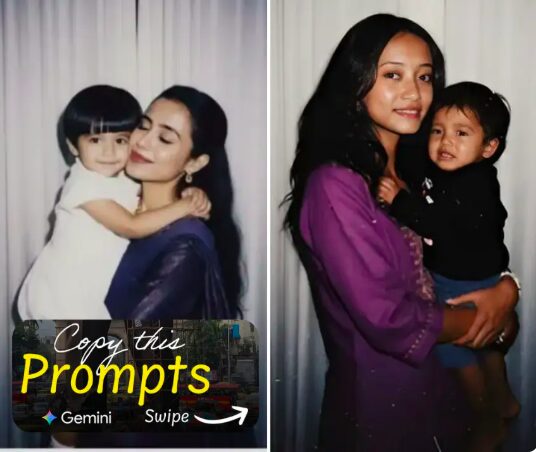
Here are 25 prompts you can try. You can use or adapt them. The goal is to guide the AI clearly so the output looks emotional and realistic.
1) “Polaroid style photo of older self hugging younger self, slight blur, white border, warm filter.”
2) “Outdoor setting at sunset showing me and my younger self embracing, gentle breeze, natural lighting.”
3) “Studio portrait with soft diffused light, older self hugging younger self, neutral background.”
4) “Child version of me wearing casual dress, older version in current clothes, hug in garden.”
5) “Rainy day under umbrella, present me hugging younger me, dramatic sky, emotional feel.”
6) “Beach at dawn, me holding younger me, waves in background, pastel sky.”
7) “Present me hugging younger me, warm golden hour light, realistic faces preserved, soft background.”
8) “Night time, fairy lights around, hugging younger self, soft glow, tender expression.”
9) “Adult version of me embraces childhood version in a sunlit room with large windows, nostalgic tones.”
10) “In a library or room with books, older hugging younger, expressing love and gratitude.”
11) “Winter day by a fireplace, the two of me hugging, cozy atmosphere, warm colors.”
12) “Snow scene, older and younger hugging, snowflakes, cozy scarves.”
13) “Forest scene with sun filtering through trees, serene, older self hugging younger self.”
14) “Abstract art style: hug my younger self, painterly texture, emotional color palette.”
15) “Vintage 90s style, grainy texture, older hugging younger, retro clothes.”
16) “Monochrome (black & white) version: older self hugging younger self, high contrast.”
17) “Soft pastel‑colored room, teddy bears or childhood toys around, hug between two selves.”
18) “Dreamy clouds backdrop, heavenly light, older embracing younger, emotional.”
19) “Golden hour in a field of flowers, present self hugging younger self.”
20) “Garden porch swing, me with younger self, gentle embrace, calm evening mood.”
21) “Minimalist style, plain background, focus on faces and hands during hug.”
22) “Mother nature setting: me and younger me near a lake, reflections in water, hugging.”
23) “Child version wearing old clothes, older wearing modern outfit, both smiling.”
24) “Cityscape background at dusk, older self hugging younger, warm street lights.”
25) “Soft indoor light, window light, older self reading to younger self, slight hug.”
How to Upload “Hug My Younger Self” Content on Social Media
Once your photo is ready, here’s how to post it online especially on Instagram or similar apps:
- Save Your Image: Download the best quality version and add filters or borders before saving.
- Write a Caption: Explain why you made the image to help people connect with your story.
- Use Hashtags: Add tags like #HugMyYoungerSelf and #SelfLove so more people find your post.
- Choose Where to Post: Instagram, TikTok, Reels, and Stories are great places to share your image.
- Give Credit: Mention the AI tool you used to be honest about how you made it.
- Engage With Your Audience: Reply to comments and share your feelings to make your post meaningful.
- Think About Privacy: Only share childhood photos you’re comfortable with and watch out for distortions.
Why This Trend Means So Much to People?
The “Hug My Younger Self” trend is more than just a photo edit. It’s a way people use AI to reflect, to connect with their past, and to show love to their younger selves. With tools like Google Gemini’s Nano Banana, the barrier is low anyone with a phone and some photos can try it. And by using thoughtful prompts, good lighting, emotional tone, one can create beautiful, shareable images.
Comments
Post a Comment