With Nano Banana AI saree trend, you can change a regular photo into a beautiful picture of yourself wearing a classic saree. The Nano Banana AI Saree prompt recently went viral across social media. It uses artificial intelligence to turn regular photos into vintage style portraits. This trend mixes the elegance of traditional Indian Sarees with the latest AI technology. It offers a unique and creative way to explore fashion just like family users are getting entertained with Hug my Younger self trend in Google Gemini.
Beyond its fun and stylish look, Nano Banana AI trend also makes us think about important issues like digital privacy. And, how we express ourselves online and the connection between culture and technology. It’s more than just an image filter it raises questions about our digital identities.
Learn how to generate beautiful images with Nano Banana AI saree prompt text for free and creation process in the below guide. Also by being creative, you can transform a simple profile pic to a professional portrait.
What is Nano Banana AI Saree trend?
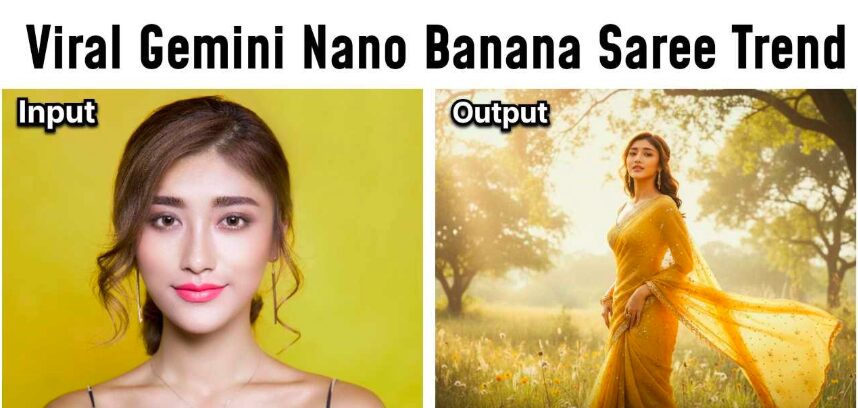
At its core, the Nano Banana AI saree trend works by using a special prompt called the “Nano Banana AI prompt.” When applied, this prompt instructs the AI to add soft lighting, vintage colors, and traditional sarees. Also, to a normal photo, making it look like a classic film poster from the 1990s.
This mix of old fashioned fashion and cutting edge technology creates a nostalgic yet modern style that’s both fun and creative. It’s why so many people are drawn to this trend, enjoying the blend of tradition with innovation.
Popular looks in Nano Banana AI Saree images
There are many popular saree looks created by this AI trend. Each style captures a different mood and lets users explore many sides of saree fashion. Here are a few favorites:
- White Polka-Dot Saree: A light, see-through white saree with small dots and a pink flower, giving a soft and gentle look.
- Purple Chiffon Saree: A breezy purple saree with wind-blown hair, making the person look like they stepped right out of a 90s film.
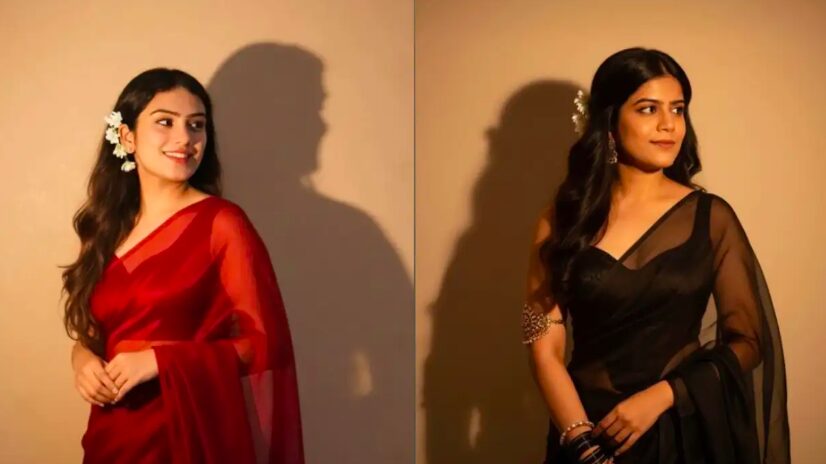
- Classic Black Saree: This look features a shiny black saree with soft light and shadow, creating a dramatic old-movie vibe.
- Golden Banarasi Saree: This style shows off a rich golden saree with floral accessories and warm lighting for a royal look.
- Red Saree Drama: Flowing red sarees with loose waves in the hair, set against warm and simple backgrounds for a romantic feel.
30+ Nano Banana AI Saree prompt text for Girls
For those eager to create their own AI-generated Google Gemini saree portraits, here are 30 AI Saree trend prompt for Gemini to inspire your creativity:
1) "Transform this person into a 90s Bollywood heroine in a black velvet saree, with dramatic lighting and a vintage film grain effect."
2) "Visualize this individual in a green saree, walking through a lush garden with sunlight dappling through the leaves."
3) "Create an image of this person in a red silk saree, standing under a monsoon sky with raindrops adding a cinematic touch."
4) "Depict this person in a royal blue saree, seated on a vintage car with a sunset in the background."
5) "Reimagine this individual in a pastel pink saree, sitting by a window with soft morning light filtering through."
6) "Imagine this individual in a yellow saree, dancing in a traditional folk performance setting."
7) "Generate a portrait of this person in a white saree with gold embroidery, set against a traditional Indian temple backdrop."
8) "Create an image of this person in a maroon saree, standing on a balcony overlooking a cityscape at night."
9) "Reimagine this individual in a purple saree, sitting in a cozy cafe with a book in hand."
10) "Visualize this person in a turquoise saree, posing in front of a historical monument."
11) "Depict this individual in a black saree, standing under a starry sky with a full moon."
12) "Generate a portrait of this person in a beige saree, walking along a beach during the golden hour."
13) "Imagine this person in a white saree, surrounded by blooming flowers in a botanical garden."
14) "Create an image of this individual in a red saree, sitting by a fireplace with a warm glow."
15) "Reimagine this individual in a silver saree, posing in front of a modern architectural structure."
16) "Visualize this person in a pink saree, standing in a field of tulips during spring."
17) "Generate a portrait of this person in a gold saree, walking through a traditional market."
18) "Depict this individual in a teal saree, sitting on a swing under a tree."
19) "Imagine this person in a brown saree, walking through a foggy forest."
20) "Generate a portrait of this person in a navy blue saree, sitting by a lake with mist rising."
21) "Reimagine this individual in a white and gold saree, standing in a palace courtyard."
22) "Create an image of this individual in a coral saree, standing on a mountain peak at sunrise."
23) "Visualize this person in a peach saree, walking through a vineyard during harvest season."
24) "Imagine this person in a burgundy saree, standing in a library with old books."
25) "Create an image of this individual in a mustard saree, walking through a sunflower field."
26) "Depict this individual in a lavender saree, sitting on a rooftop with city lights below."
27) "Generate a portrait of this person in a charcoal grey saree, standing in an art gallery."
28) "Visualize this person in a emerald green saree, walking through a snow-covered landscape."
29) "Depict this individual in a fuchsia saree, standing in a bustling street market."
30) "Reimagine this individual in a champagne saree, sitting at a vintage piano."
How to make Nano Banana AI Saree Trend prompt?
In the age of artificial intelligence, creativity knows no limits and fashion is no exception. Best of all? You don’t need to be a graphic designer or model just your photo and the right tools.
- Log in to your Google account and open Gemini.
- Click on “Try Image Editing” (look for the banana icon).
- Upload a clear solo photo with your face visible.
- Paste a viral AI saree prompt (e.g., "make me look in a red silk saree").
- Let the AI generate your saree look in seconds!
Nano Banana AI Saree trend risks
The Nano Banana AI platform offers unique opportunities for both single individuals and couples to explore fashion and identity:
- For Couples: Partners can create coordinated portraits, showcasing matching saree styles or complementary themes, celebrating their bond through shared digital expressions.
- For Single girls: The AI allows users to experiment with different saree styles and settings, providing a virtual space to explore personal aesthetics without the need for physical attire.
By uploading clear, solo photos and using specific prompts, users can generate personalized Nano Banana AI saree trend images that reflect their style and personality. Also keep in mind that while Google is a reputed company, you must read their Terms and conditions before uploading your personal images.
Future of Fashion with Google Gemini Nano Banana AI trends
The Nano Banana AI saree trend is a fun way to mix old-style fashion with new technology. It lets people see themselves in beautiful sarees without actually wearing one. Whether you’re single or with someone, you can try many saree looks and share your pictures easily like Hug my Younger self trend that has also went viral. Just be careful when using AI tools, and enjoy this cool way to celebrate sarees and style online.
This feels as the beginning and Google Nano Banana AI saree trend will lead to more AI trends in the future. This means, people can see themselves in different avatars. Content like this can be posted to Instagram Bio, Stories, Snapchat to create beautiful profile images. Bookmark DROIDUNCLE to check more AI trends released by Google, ChatGPT and more AI engines.
Comments
Post a Comment